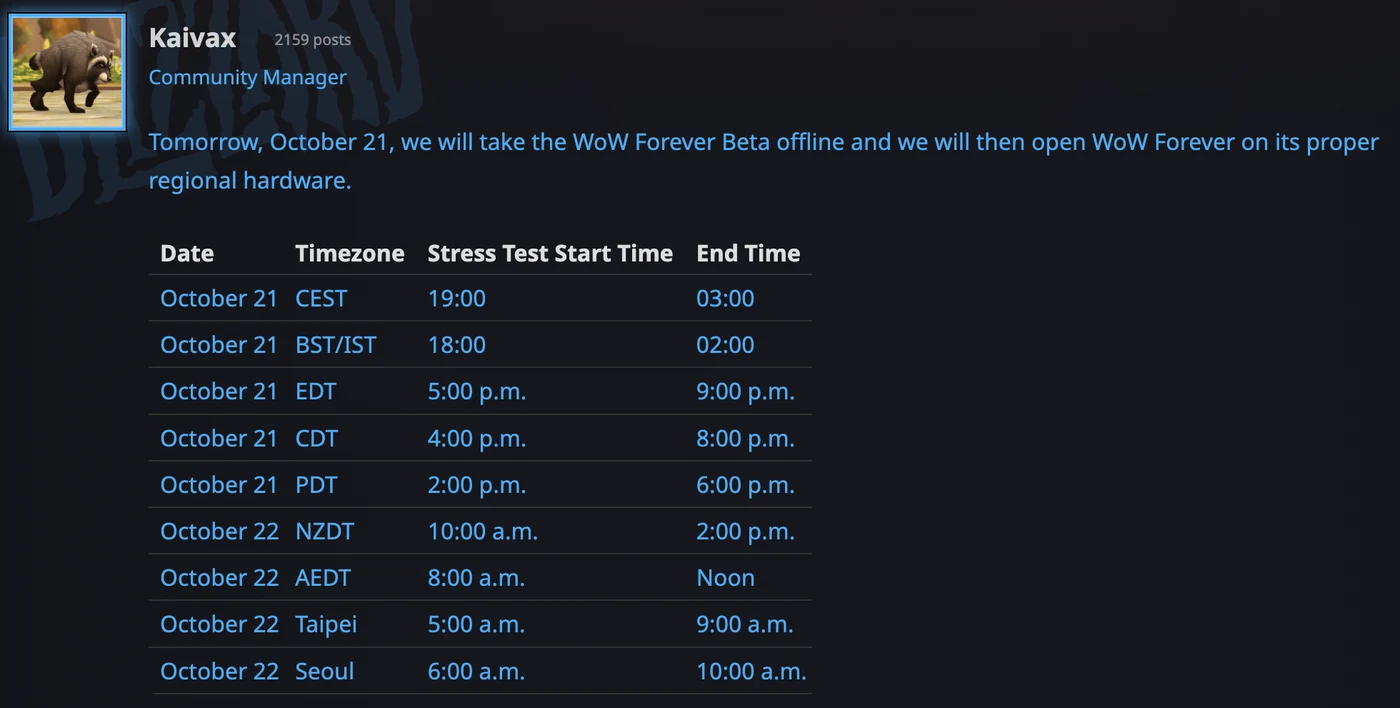
On October 21, any WoW account could join the stress test for a few hours without a subscription. The test has ended; these were the steps published at the time.
How to join, step by step
These are the steps Blizzard posted for the test:
- Update your graphics drivers.
- Open the Battle.net desktop app and let it update if needed.
- Select World of Warcraft from the list of games.
- In the Game Version menu above the Play button, pick World of Warcraft: Forever Stress Test under In Development, then click Install.
- Once the install is done and the test begins, click Play and choose an available test realm.
- Create a new test character and enter the game.
Install before the start time: in the Americas the test only lasts four hours.
Today’s schedule
| Region | Start (Oct 21) | End |
|---|---|---|
| Americas (Pacific) | 2:00 p.m. PDT | 6:00 p.m. PDT |
| Americas (Central) | 4:00 p.m. CDT | 8:00 p.m. CDT |
| Americas (Eastern) | 5:00 p.m. EDT | 9:00 p.m. EDT |
| UK and Ireland | 18:00 BST/IST | 02:00 |
| Europe (Central) | 19:00 CEST | 03:00 CEST |
Oceania, Taiwan and Korea play on the morning of October 22. Every region is in the full stress test schedule.
What happens when it ends
- Everything is wiped. Blizzard deletes every stress test character, names included. Real names are claimed during name reservation, October 27 to November 3.
- The beta comes back. When the test shuts down, Blizzard reopens the beta, which now runs until Friday, October 23.
- Then, launch. WoW Forever releases on November 4. If you do not buy a pack, the other free way in is an Invite-A-Friend code from November 4 to 11.
Make the hours count
- Arrive with your class decided. If you are unsure, read the best class to start with.
- Have your first talents ready in the talent calculator.
- Check how your PC runs in a crowded starting zone and compare it with the system requirements.
About this story
The steps come from Blizzard’s official stress test post on the WoW Forever beta forums. If Blizzard changes anything during the test, we will update this page.
Sources and data status
Sources from the original publication, reviewed October 21, 2026. This article preserves the context of a test that has ended.